

Imagine setting up GraphQL on projects that had 7 endpoints. You spend days configuring resolvers, fighting N+1 queries, debugging why errors came back as 200s, only to realise REST would have shipped the same thing faster.
GraphQL is powerful. But most apps don't need what it offers.
The Shift From REST to GraphQL
GraphQL was built at Facebook to solve real scaling problems. Too many API calls, too much unnecessary data, multiple clients with different needs - it made sense.
But then the industry started using it everywhere.
Suddenly, even small apps with a single frontend and a few endpoints were adding schemas, resolvers, DataLoaders, frontend GraphQL clients like Apollo and query layers because GraphQL felt like the "modern" architecture choice.
So What is GraphQL, Actually?
GraphQL is a query language for your API. Instead of hitting multiple endpoints and getting back whatever the server decides, the client sends a single query describing exactly what data it needs and gets back only those fields.
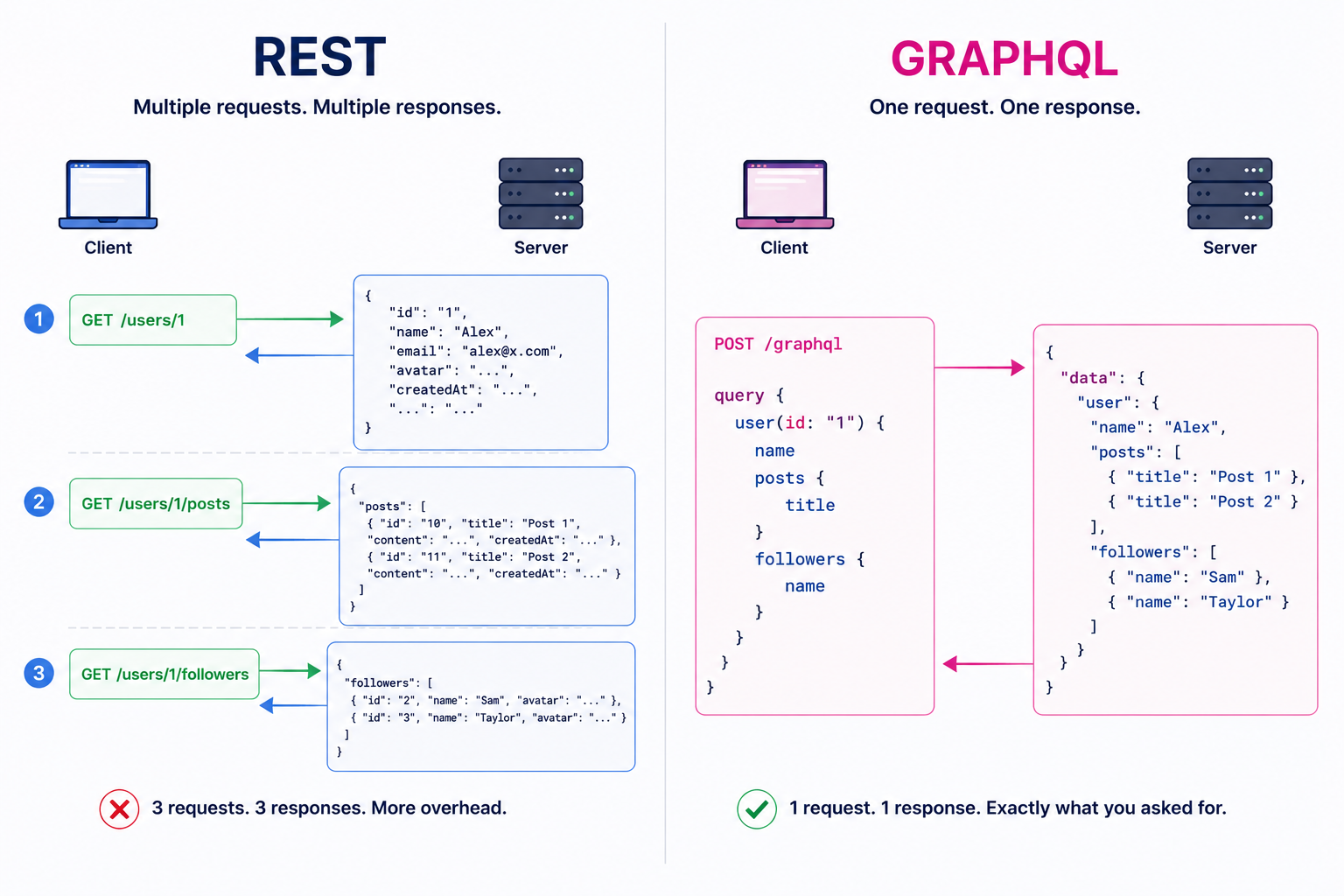
GraphQL usually runs through a single endpoint like /graphql, where queries, mutations, and subscriptions are handled.
How GraphQL Actually Works
The Schema
Everything in GraphQL starts with the schema. It acts like a contract between the client and server, defining what data exists and what can be queried.
type User {
  id: ID!
  name: String!
  posts: [Post!]!
}

type Post {
  id: ID!
  title: String!
}

type Query {
  user(id: ID!): User
}
This becomes the source of truth for your API. Clients can clearly see what fields are available, which ones are required, and what type of data they’ll get back.
query {
  user(id: "1") {
    name
    posts {
      title
    }
  }
}
Resolvers — How GraphQL Fetches Data
When a query comes in, GraphQL calls resolver functions for each requested field. Resolvers act as the bridge between the GraphQL layer and your application logic.
const resolvers = {
  Query: {
    user: (parent, args, context) => {
      return userService.getUserById(args.id);
    }
  },

  User: {
    posts: (parent, args, context) => {
      return postService.getPostsByUserId(parent.id);
    }
  }
}
Query.userfetches the user usingargs.idThe returned user object becomes the
parentfor the next resolverUser.postsusesparent.idto fetch posts for that userGraphQL combines everything into a single response automatically
The Request Path
Here's what actually happens when a GraphQL query hits your server:
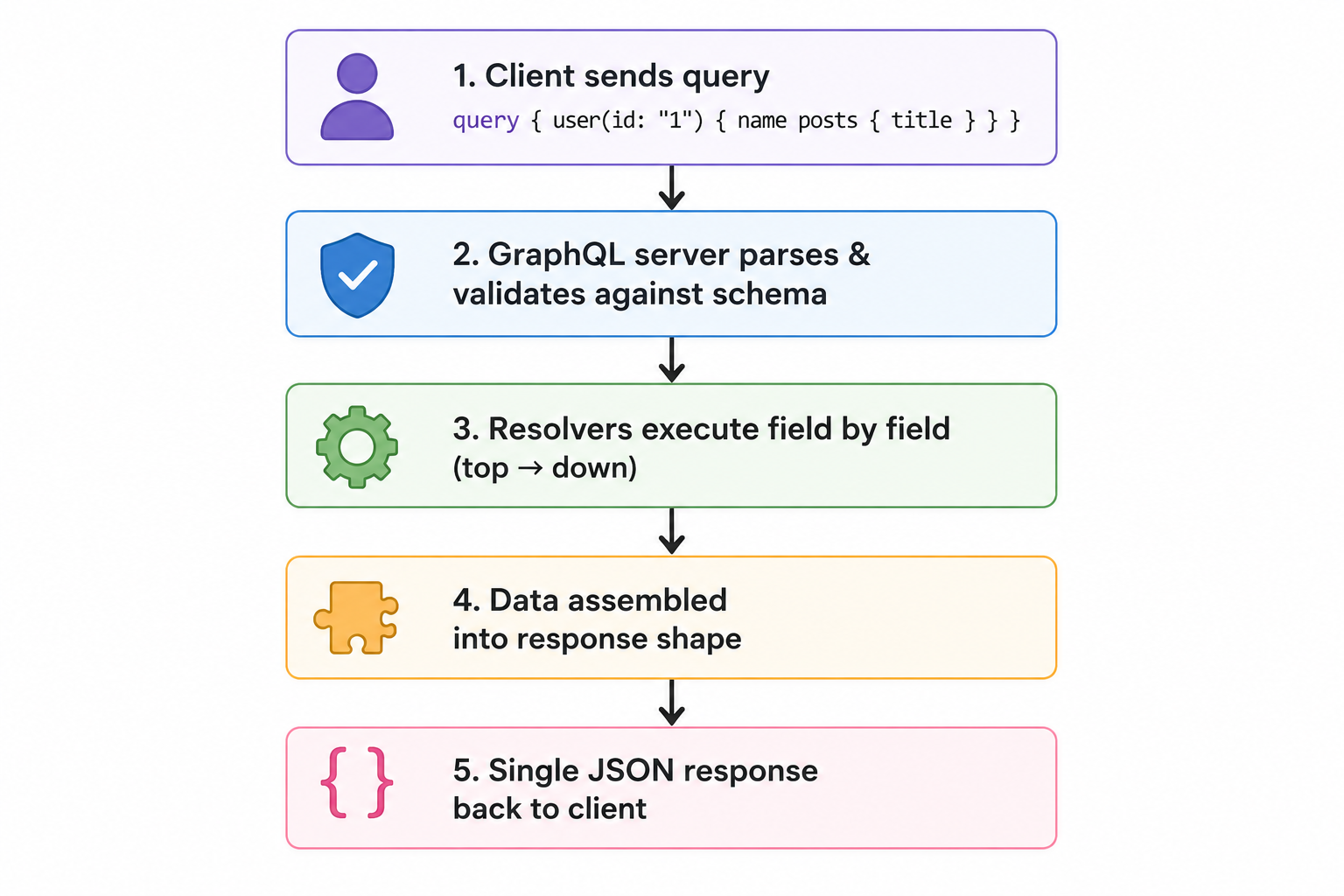
GraphQL walks through the query field by field, calls the matching resolvers, and assembles the final response shape automatically.
The N+1 Problem
Let's take an example query:
query {
  posts {
    title
    author {
      name
    }
  }
}
Here’s what can happen behind the scenes:
GraphQL first fetches all posts - 1 database query
Then for every post, it separately fetches the author - N additional queries
So if there are 10 posts, the server ends up making:
1 query for posts + 10 queries for authors = 11 database calls
That’s called the N+1 problem.
To avoid this, GraphQL applications usually use tools like DataLoader to batch and cache repeated requests so authors can be fetched together instead of one by one.
Post: {
  author: (parent, args, context) => {
    return context.userLoader.load(parent.authorId);
  }
}
Instead of fetching each author separately, DataLoader collects all the authorIds first and then it batches them into a single database query:
SELECT * FROM users WHERE id IN (1,2,3,4,5)
So instead of many small queries, it batches them into one optimized fetch.
What GraphQL Actually Solves
Getting only the data you need - Sometimes a frontend only needs 2–3 fields, but a REST endpoint returns a huge object with lots of unnecessary data. GraphQL lets the client request only the required fields.
Supporting different clients easily - A mobile app, web app, and admin dashboard may all need different data from the same backend. With GraphQL, each client can request its own data shape without creating separate endpoints.
Helping fast-changing frontends - If the UI changes often, frontend teams can update queries themselves without constantly asking backend teams to modify APIs.
**Handling connected data better -**GraphQL works well when data is deeply linked like users, posts, comments, tags, followers, dashboards, etc.
What REST Still Does Better
Caching is simpler - REST works naturally with browser and CDN caching using normal GET requests. GraphQL usually needs extra setup for proper caching.
Errors are easier to understand. In REST:
404means not found403means unauthorized500means server error
In GraphQL, many responses still return 200 OK, even when errors happen, which can make debugging harder.
File uploads are easier - REST handles file uploads cleanly using standard HTTP APIs. In GraphQL, uploads often need additional libraries or separate REST endpoints anyway.
It’s easier to learn and maintain - Most developers already understand REST. GraphQL adds extra concepts like schemas, resolvers, DataLoaders, Apollo client, and query management.
The Right Tool for the Right Problem
The best systems usually don’t treat REST and GraphQL as enemies. They use each where it makes sense.
REST for auth (
/login,/refresh,/logout), file uploads, webhooks, public-facing endpointsGraphQL for the internal data querying layer where clients have complex, evolving needs
GitHub, Shopify, and Stripe do exactly this. They didn't abandon REST - they added GraphQL where it earned its place.
If your app is mostly CRUD, has a small number of clients, and fairly predictable data needs, REST is usually more than enough.
GraphQL is an excellent tool.
But excellent tools become expensive when used for problems that don’t exist.
Most applications don’t need “future-proof architecture.”
They need simple systems that are easy to ship, debug, and maintain.
— AbhignaConsole Diaries — a developer’s notes
Connect with me on LinkedIn: a6h1gna


